
A surprising proportion of network problems that appear to be equipment faults are actually cabling faults, and cabling is the one layer nobody looks at because it is inside the walls. Here is what to understand about it.
What Structured Cabling Means
It describes a planned, standards based cabling system rather than an accumulation of cable runs added over time.
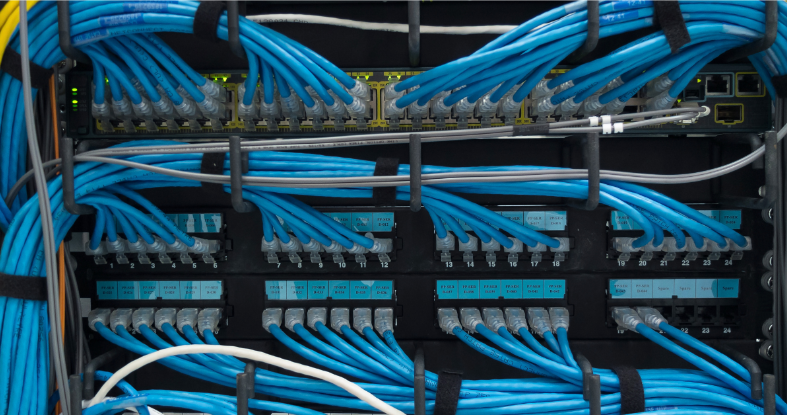
A structured system has a defined hierarchy. A main distribution point, horizontal runs to work areas, properly terminated outlets, patch panels, and documentation showing what connects where.
What most buildings have instead is organic. Cable added when someone moved desks, another run for a printer, a length pulled through a ceiling during a refit. Nothing labelled, nothing documented, several runs terminating nowhere.
The difference matters because organic cabling cannot be diagnosed. When a problem appears, nobody knows what is connected to what, so troubleshooting becomes guesswork.
Symptoms That Trace Back To Cabling
Intermittent connectivity in specific locations rather than across the building. Cabling faults are physical and therefore local.
Speeds well below what the equipment supports, particularly a connection negotiating at a hundred megabits when the hardware supports a gigabit. That is a classic damaged or poorly terminated cable.
Devices dropping and reconnecting repeatedly.
Voice quality problems on IP phones, since voice is sensitive to packet loss that data traffic tolerates.
Problems that appear after building work, which is frequently exactly when a cable was crushed, kinked or disconnected.
And errors accumulating on switch ports, which is the most direct evidence available if anyone looks.
Cable Categories In Plain Terms
Category 5e supports gigabit speeds and remains adequate for many purposes. Plenty of buildings still run it successfully.
Category 6 supports higher speeds over shorter distances and is the common standard for new installation.
Category 6a extends higher speed performance over full distance and offers better interference resistance.
Category 7 and above exist for specialised requirements.
The practical point is that installation quality matters more than category. Category 6 cable installed badly performs worse than Category 5e installed properly, so specifying a higher category does not compensate for poor workmanship.
What Proper Installation Involves
Respecting the maximum run length. Ethernet has a distance limit and exceeding it produces exactly the intermittent behaviour that gets blamed on equipment.
Maintaining bend radius. Cable kinked tightly around a corner has its performance permanently degraded, and the damage is invisible.
Separation from electrical cable and fluorescent fixtures, since both introduce interference.
Correct termination, which is where a large share of faults originate. Untwisting pairs too far back at the connector is a common and consequential error.
Proper support and management rather than cable resting on ceiling tiles or hanging from its own weight.
Plenum rated cable where required by code in air handling spaces, which is a genuine safety requirement rather than an upsell.
And testing every run with a certifying tester, producing documentation. This is what separates professional installation from cable pulling, and it is worth insisting on for any wired network installation.
Wireless Does Not Remove The Need
This is the most common misconception, and it gets more common as wireless improves.
Every access point connects to the network by cable. A wireless network is only as good as the cabling feeding it, and modern access points require more capable cabling than older ones to deliver their rated performance.
Power over Ethernet compounds this, since the same cable delivers power as well as data. Higher power devices place real demands on cable quality, and marginal cable produces devices that reboot intermittently.
So a wireless upgrade frequently requires cabling work first. Deploying enterprise wireless infrastructure onto inadequate cabling produces disappointing results that get blamed on the wireless equipment.
When Recabling Is Justified
When troubleshooting keeps returning to the same physical area.
When you cannot document what is connected where, because that makes every future change more expensive.
Before a significant upgrade, since discovering cabling limitations after buying equipment is the expensive sequence.
During any renovation, because ceilings and walls being open reduces the cost of the work dramatically.
When the building has changed use or layout substantially since the cabling was installed.
Recabling is disruptive and it is a one time cost against a problem that otherwise recurs indefinitely. Most organisations that do it properly stop having the category of problem they had been managing for years.
A partial approach is frequently sensible. Rather than recabling an entire building at once, address the worst area first and document it properly. That establishes whether cabling was genuinely the cause before committing to the full scope, and it spreads the cost across budget cycles.
Frequently Asked Questions
How do I know if my network problems are caused by cabling?
Look for problems confined to specific locations rather than the whole building, connections negotiating below their rated speed, devices dropping repeatedly, voice quality issues on IP phones, and errors accumulating on switch ports. Problems appearing after building work are a strong indicator.
What is structured cabling?
A planned, standards based cabling system with a defined hierarchy of distribution points, horizontal runs, properly terminated outlets and patch panels, along with documentation. It contrasts with cabling accumulated over time without records, which cannot be reliably diagnosed.
Is Cat6 cable necessary or is Cat5e still adequate?
Category 5e supports gigabit speeds and remains adequate for many purposes. Category 6 is standard for new installation. Installation quality matters more than category, since poorly installed Category 6 performs worse than properly installed Category 5e.
Do I still need cabling if we use wireless?
Yes. Every access point connects by cable, and modern access points require more capable cabling to deliver rated performance. Power over Ethernet adds further demands. A wireless upgrade onto inadequate cabling produces poor results.
When should a building be recabled?
When troubleshooting repeatedly returns to the same area, when nothing is documented, before a significant network upgrade, during renovation while ceilings are open, or when building layout has changed substantially since installation.